What is Payments & Subscription Management?
Payments and subscription management help you choose the right plan, manage your billing cycle, and control what happens to your subscription after purchase. This keeps your AI Receptionist usage aligned with your business needs and helps you understand cancellation and refund conditions before taking action.
Before You Continue
The onboarding payment flow is documented separately. This guide focuses on the post-onboarding payment and subscription journey.
- The first purchase uses the $5 PAY-AS-YOU-GO plan.
- If payment is skipped during onboarding and the first purchase is made later through Upgrade, that first purchase still uses the $5 PAY-AS-YOU-GO plan.
- After the $5 PAY-AS-YOU-GO purchase, regular Upgrade plans are available.
Current PAY-AS-YOU-GO Plan
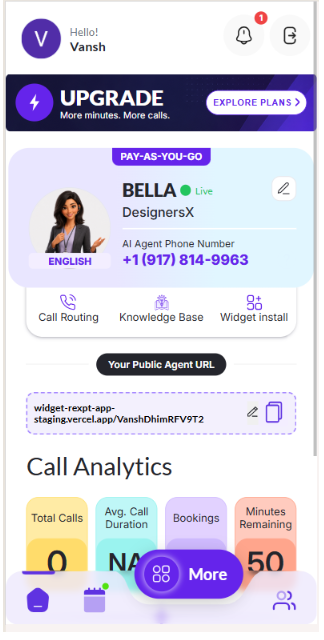
The dashboard shows the current PAY-AS-YOU-GO subscription and provides the Explore Plans entry point used to start the Upgrade flow.
Upgrade Your Plan
Upgrade lets you move to a plan with more included minutes and additional capabilities when your business needs more from the AI Receptionist.

This screen shows the current PAY-AS-YOU-GO subscription and the Explore Plans entry point used to start the Upgrade flow.
Step 1 — Start the Upgrade Flow
From the more button select Upgrade Agents to view the available plans.

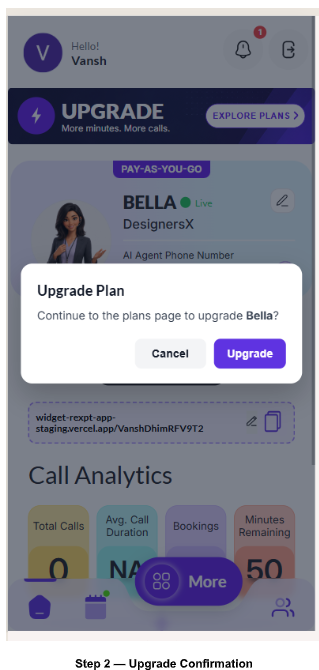
Step 2 — Confirm Upgrade
Review the Upgrade confirmation and select Upgrade to continue to the plans page.
Step 3 — Choose Billing Frequency
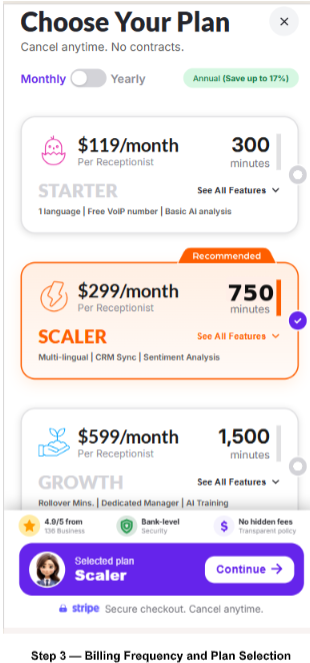
On the plan-selection screen, choose the available billing frequency, such as Monthly or Yearly, before selecting a plan.
Choose Your Plan
Starter, Scaler, and Growth are all part of the same Upgrade plan-selection flow. Compare their price, included minutes, core features, and additional capabilities before selecting one.
Starter — $119/month | 300 Minutes
Starter is the entry plan for businesses that need the core AI receptionist experience and essential features with 300 included minutes.
- AI Voice & Chat
- 5-minute setup
- Calendar Booking
- 1 language
- Free VoIP number
- Basic AI Analysis
- Multi-lingual Support, CRM Sync, and Sentiment Analysis

In simple terms: More calls + multiple languages + CRM connectivity + better customer insight.
Scaler — $299/month | 750 Minutes
Scaler is for businesses that need more call capacity than Starter and want additional capabilities for multilingual communication, CRM connectivity, and customer insights.
- 750 minutes
- AI Voice & Chat
- 5-minute setup
- Calendar Booking
- Multi-language support
- Free VoIP number
- Basic AI Analysis
- Multi-lingual Support, CRM Sync, and Sentiment Analysis

Scaler is selected in the comparison tabs. The screen shows $299/month, 750 minutes, the plan features, and the Selected plan area with Continue.
Growth — $599/month | 1,500 Minutes
Growth is for higher call volume and businesses that need advanced capabilities and support beyond the core receptionist experience.
- 1,500 minutes
- AI Voice & Chat
- 5-minute setup
- Calendar Booking
- Multi-language support
- Free VoIP number
- Basic AI Analysis
- Rollover Minutes, Dedicated Manager, and AI Training
In simple terms: Highest minutes + advanced support + training + unused-minute flexibility.

Growth is selected in the comparison tabs. The screen shows $599/month, 1,500 minutes, the Growth features, and the Selected plan area with Continue.
Plan Selection & Checkout
After choosing a plan, review the selected plan and continue to the secure checkout flow.
- Verify the selected plan.
- Check the billing frequency.
- Review the displayed price and included minutes.
- Review the features shown for the selected plan.
- Select Continue to proceed to checkout.
Payment Methods & Billing History
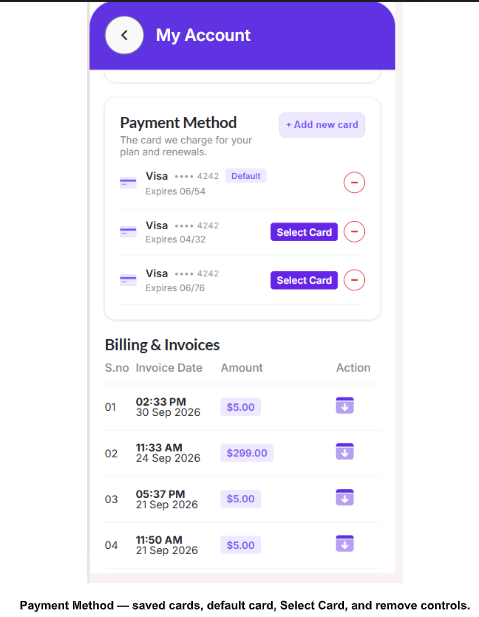
Keep at least one payment card saved so REXPT has a payment method available for plan charges and renewals. From My Account, you can add a card, select a saved card, or remove a card.

Add a New Card
Select + Add new card, enter the card number, expiration date, security code, and country, then select Save card.

Manage Saved Cards
Use Select Card to choose another saved payment method. Use the remove icon to delete a saved card. Keep at least one card on the account.
Billing & Invoices
Billing & Invoices shows your recorded charges with the serial number, invoice date, amount, and an action icon for accessing the invoice.

Manage Your Subscription
After a subscription is active, More Settings provides controls for managing the plan and agent status, including Upgrade Agent, Cancel Subscription, and Deactivate Agent.
Open Subscription Controls
Open More and then More Settings to access the available subscription-management actions.
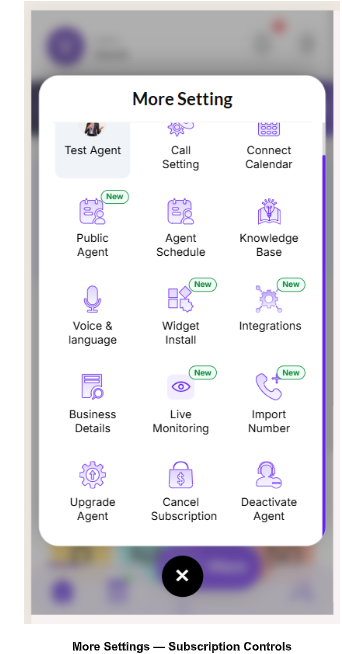
The More Settings screen provides the controls used to manage the AI Receptionist subscription and agent status including Upgrade Agent, Cancel Subscription, and Deactivate Agent.
Cancel Subscription
Cancel Subscription is used when you do not want the current subscription to continue into the next billing cycle.
- If the subscription is non-refundable, the current paid/billing cycle continues.
- The next billing cycle does not automatically continue after cancellation.
- Reactivate becomes available after cancellation.
- Reactivate is not shown while the subscription remains active.

This confirmation screen explains that no refund is available under the displayed policy, the current plan remains active until the end of the paid period, and if the subscription is not renewed, the agent will be deactivated and its number released. The user can open View Refund Policy, select a cancellation reason, and choose Yes, Cancel to confirm.
Reactivate a Cancelled Subscription
Reactivate Before the Current Period Ends
If you reactivate before the current billing period ends, the cancellation is reversed and the existing subscription continues. Nothing is charged immediately; the applicable plan is charged on its renewal date.
Reactivate After the Subscription Has Ended
If the subscription has already expired, reactivation starts a new paid subscription based on the previous plan. Because the previous number is released after the subscription ends, a new number is assigned when the subscription is reactivated.

Cancel → Subscription ends → Number released → Reactivate → Previous plan billing starts → New number assigned → Normal billing cycle continues.
The My Subscriptions screen shows the cancelled subscription details and the Reactivate action.

This confirmation shows that the existing Pay-As-You-Go + $5 number plan will continue with the same number with no charge immediately; the saved card will be charged on the displayed renewal date.
Deactivate Agent
Deactivate Agent temporarily pauses the AI Agent when you want to take a break without permanently ending the subscription.
Pause Your Agent
Pausing stops your monthly minutes immediately. The confirmation asks why you are pausing, with options such as Taking a temporary break, Low call volume, Too expensive, or Other reason.
Select Yes, Pause to deactivate the agent.
While the agent is deactivated, those paused days are not counted as active days for refund calculations. Only active days count toward the applicable active-day period.
When you reactivate the agent, billing resumes according to the subscription flow.
Refund Policy
PAY-AS-YOU-GO ($5) — No Refund
The $5 PAY-AS-YOU-GO charge covers the assigned phone number. Additional charges are based on actual usage, so the total amount increases according to how much the service is used. Because this plan is usage-based, refunds are not available for PAY-AS-YOU-GO.

Regular Plans — Starter, Scaler & Growth
For regular subscription plans, a refund is eligible only when both conditions are satisfied:
- The request is within 7 active days.
- Usage is 10% or less.
Both conditions are mandatory. If either condition fails, the refund is not available.
Deactivated days are not counted as active days for the 7-active-day refund calculation. Only days when the subscription or agent is active count toward the active-day period.
For an eligible regular-plan refund, the policy includes a 10% deduction from the eligible refund amount.
Refund vs. Cancellation
Cancellation controls whether the subscription continues into the next billing cycle. Refund eligibility is determined separately using the active-day and usage conditions.
- Cancelling a subscription does not automatically make it refundable.
- Refund eligibility requires both the 7 active-day and 10% usage conditions.
- If refund conditions are not met, the current plan and number continue through the current billing cycle.
- Deactivated days do not count toward the 7 active days.
Important Notes
- $5 PAY-AS-YOU-GO applies to the first purchase in the current flow.
- Regular plans are available after the first $5 PAY-AS-YOU-GO purchase.
- Monthly and Yearly are the billing-frequency options shown in the plan flow.
- Starter includes 300 minutes, Scaler 750 minutes, and Growth 1,500 minutes.
- Starter, Scaler, and Growth are one combined plan-selection flow.
- Cancel Subscription and Deactivate Agent are separate controls.
- Reactivate appears after cancellation.
- Deactivated days are not counted as active days for refund eligibility.
Confirm Your Subscription Setup
- Selected plan and billing frequency are correct.
- Included minutes and plan features have been reviewed.
- You understand whether this is the first $5 PAY-AS-YOU-GO purchase or a regular plan.
- If cancelling, you understand the current billing-cycle behavior.
- If requesting a refund, you have checked both active days and usage.
- If the agent was deactivated, those days have been excluded from active-day calculation.