AI Receptionist
Published on Sep 3, 2026
How AI Receptionist Appointment Booking Works: Setup, Scheduling Rules, and Common Mistakes

Rexpt Editorial Team
10 min read
AI appointment booking requires more than calendar access. Learn how an AI receptionist checks availability, applies scheduling rules, collects caller details, confirms appointments, and handles exceptions.
A caller says:
“I need to book an appointment sometime Thursday afternoon.”
That sounds simple.
But before an AI receptionist can confirm anything, several questions have to be answered.
What service does the caller need? How long does that appointment take? Which employee or location can handle it? Is Thursday afternoon actually available? Does the business allow same-day bookings? Is travel time required between appointments? What information must be collected before a slot can be reserved?
That is the difference between taking an appointment request and actually booking an appointment.
A well-configured AI receptionist can help move a caller from enquiry to confirmed booking during the conversation. But reliable appointment booking depends on more than giving AI access to a calendar.
It requires a controlled scheduling workflow.
What Is AI Receptionist Appointment Booking?
AI receptionist appointment booking is the process of allowing a conversational receptionist to collect scheduling information from a caller, check approved availability, apply the business's booking rules, create or update an appointment, and confirm the outcome.
The important word is approved.
A booking system should not simply find an empty-looking space on a calendar and place an appointment there.
It needs to understand what the business allows.
For example:
- Which services can be booked
- How long each appointment takes
- Which employee or location handles each service
- What days and hours are available
- How much notice is required
- Whether buffer time is needed
- Which caller details are mandatory
- What should happen when no suitable slot exists
Scheduling platforms themselves already depend on rules like appointment duration, availability, minimum lead time, buffer time, daily booking limits, and conflict checks. Google Calendar's appointment scheduling documentation, for example, supports these types of controls.
An AI receptionist sits on top of this scheduling logic and makes it accessible through a phone conversation.
Taking a Message Is Not the Same as Booking an Appointment
This distinction matters when businesses compare AI receptionist products.
Consider two calls.
Scenario A: Appointment Request Captured
The caller says they want an appointment on Friday.
The receptionist collects:
- Name
- Phone number
- Preferred time
- Reason for calling
Your team receives the information and must contact the customer later to actually schedule the appointment.
That is useful lead capture.
But it is not a completed booking.
Scenario B: Appointment Confirmed
The caller requests Friday.
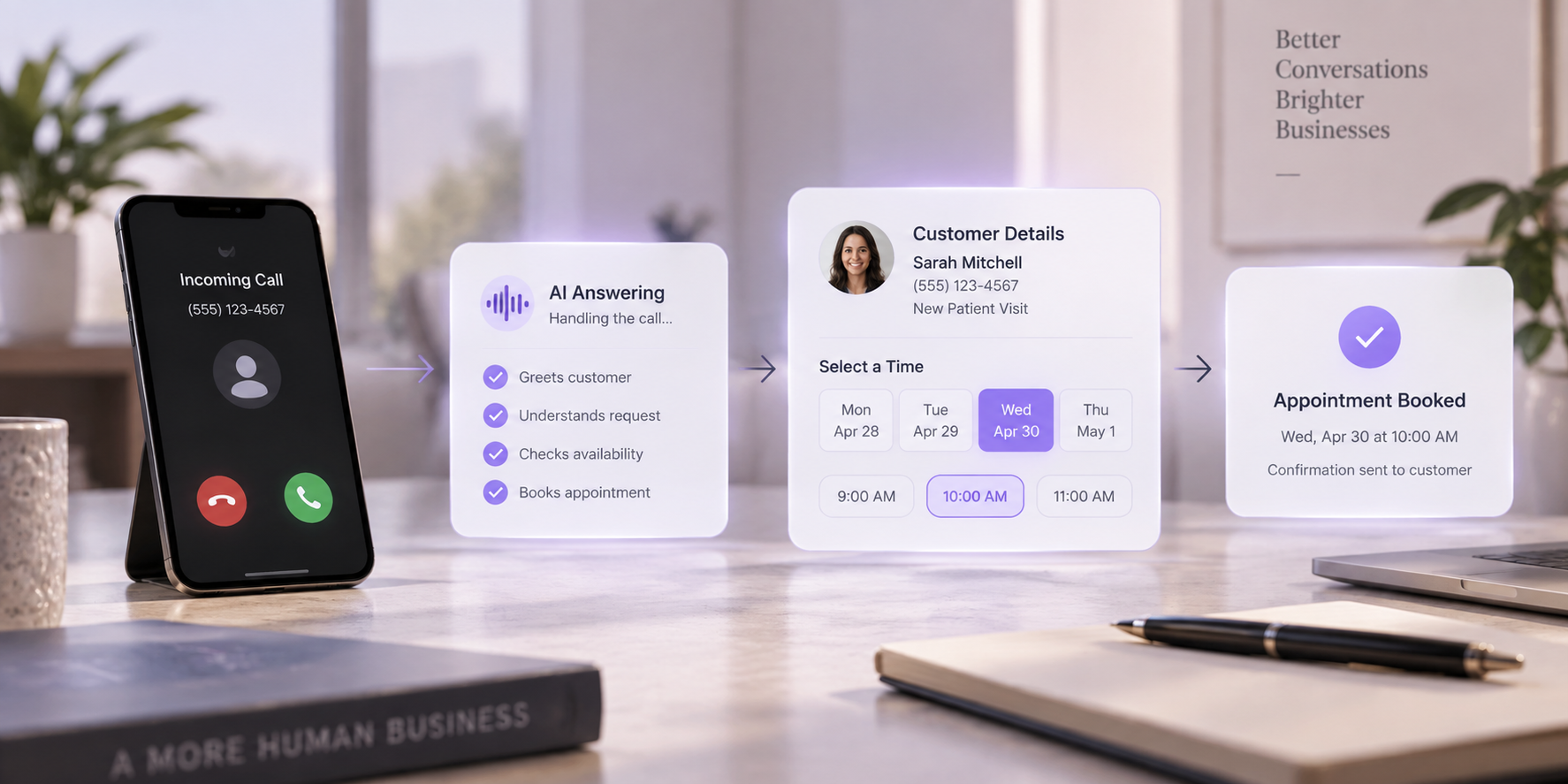
The AI receptionist checks the connected scheduling system, identifies an approved available slot, confirms the caller's details, creates the appointment, and tells the caller that the booking is confirmed.
The business's schedule now reflects the appointment.
That is appointment booking.
A useful question when evaluating any AI receptionist is therefore: does it create the appointment in the scheduling system, or does it only create a request for someone else to process?
How AI Receptionist Appointment Booking Works Step by Step
The exact workflow varies by business and integration, but a reliable booking process usually follows the same basic sequence.
Step 1: Understand What the Caller Wants
The process begins with intent.
A caller might say:
- “I'd like to book an appointment.”
- “Can someone come out tomorrow?”
- “I need to move my appointment.”
- “Do you have anything available this afternoon?”
- “Can I see the dentist next week?”
Before touching the calendar, the receptionist needs to understand whether this is:
- A new booking
- A reschedule
- A cancellation
- An availability question
- A request that needs human assistance
This matters because each intent may follow a different workflow.
An AI receptionist can use the conversation plus configured business information to determine what the caller is trying to accomplish before moving into the scheduling process.
Step 2: Identify the Appointment Type
Not every appointment is interchangeable.
A business may offer:
- 15-minute consultations
- 30-minute follow-ups
- 60-minute initial appointments
- On-site service visits
- Estimates
- Demonstrations
- Different services at different locations
The appointment type can determine:
- Duration
- Eligible employees
- Location
- Required information
- Available scheduling windows
- Preparation requirements
For a home-service business, “routine maintenance” and “new installation estimate” may need different scheduling logic.
For a dental practice, a routine cleaning and a new-patient consultation may follow different booking processes.
The AI therefore needs enough context to select the correct scheduling path rather than simply asking, “What time works for you?”
Step 3: Collect the Required Booking Information
Before an appointment is created, the business may require specific information.
Common fields include:
- Caller name
- Phone number
- Service requested
- Preferred date or time
- Location
- Address
- New or existing customer status
- Relevant notes
But businesses should resist the temptation to collect everything they could possibly want.
The better principle is:
Collect what is necessary to make the booking useful and valid.
Too many questions create friction. Too few can leave the team with an appointment they cannot properly prepare for.
Step 4: Check Live Availability
This is where the calendar or scheduling integration becomes important.
The receptionist should check the availability available to the connected workflow rather than inventing a time based only on normal business hours.
For example, a company may normally operate from 9 AM to 5 PM, but that does not mean every 30-minute period between 9 and 5 is bookable.
There may already be:
- Existing appointments
- Staff meetings
- Time off
- Travel blocks
- Holidays
- Full-day events
- Other scheduling restrictions
Modern calendar systems can check existing events to prevent conflicting slots from appearing as available. Google Calendar, for instance, allows appointment schedules to check selected calendars for busy periods and remove those periods from bookable availability.
Business hours tell the system when you operate. Calendar availability tells it when you can actually accept the appointment.
Those are not the same thing.
Step 5: Apply the Business's Scheduling Rules
Availability alone is still not enough.
Imagine the calendar shows 2:00 PM as empty.
Can the receptionist book it?
Maybe.
The answer depends on the rules.
Common scheduling rules include:
- Minimum notice before an appointment
- Maximum advance booking window
- Appointment duration
- Buffer time
- Maximum appointments per day
- Staff availability
- Service-specific availability
- Location restrictions
- Same-day booking rules
- Business-hour restrictions
For example, a contractor may require at least two hours of notice for a service visit.
A consultant may allow 30-minute discovery calls but require a 15-minute buffer between meetings.
A business with several technicians may assign different services to different people.
Calendar availability tells you what looks open. Booking rules determine what is actually bookable.
This is one of the most important parts of AI appointment scheduling.
Step 6: Offer Suitable Appointment Options
Once the system knows what the caller needs and which slots satisfy the rules, it can present available options.
A useful conversation might sound like:
“Thursday has availability at 1:30 PM and 3:00 PM. Would either work for you?”
That is usually more practical than reading a long list of every open time.
If neither option works, the workflow can continue looking for another approved date or time.
The goal is to turn calendar data into a natural conversation without allowing the conversation itself to override scheduling rules.
Step 7: Confirm the Details Before Creating the Booking
Before writing the appointment into the system, the receptionist should confirm the important details.
For example:
“Just to confirm, that's a service consultation for Thursday, September 17 at 3:00 PM under Sarah Williams. Is that correct?”
This gives the caller a chance to catch:
- Incorrect date
- Incorrect time
- Incorrect service
- Incorrect name
- Incorrect location
Date and time confirmation matters particularly when callers use phrases such as:
- “Next Friday”
- “Tomorrow afternoon”
- “The Friday after that”
- “Around three”
- “First thing in the morning”
The system should resolve those phrases into an actual date and time before finalizing the appointment.
Step 8: Create the Appointment
Once the caller confirms the details, the booking can be written into the connected scheduling system.
The calendar entry may include information such as:
- Customer name
- Contact information
- Appointment type
- Date and time
- Assigned employee
- Address or location
- Notes collected during the call
The exact information depends on the integration and business setup.
At this point, the caller has moved from:
“I want an appointment.”
to:
“I have an appointment.”
That is the operational value of direct booking.
Step 9: Confirm the Outcome
The receptionist should clearly tell the caller whether the booking succeeded.
For example:
“You're booked for Thursday at 3:00 PM.”
Depending on the configured workflow, the business may also use email, SMS, calendar notifications, or its existing scheduling system to provide confirmation or reminders.
A booking should not be treated as complete simply because the AI attempted to create it.
The workflow should know whether the appointment was successfully recorded before telling the caller it is confirmed.
What Happens When the Requested Time Is Not Available?
This is where good appointment workflows become noticeably different from simple calendar automation.
Suppose a caller says:
“I need Tuesday at 10.”
But Tuesday at 10 is already booked.
The receptionist should not force the request into the calendar.
Instead, the workflow could:
- Check nearby approved availability.
- Offer one or more alternatives.
- Ask whether another day works.
- Collect a callback request if no suitable slot exists.
- Escalate when the request requires human judgment.
The correct fallback depends on the business.
“No availability” is an expected scheduling outcome, not a system failure.
How Should Rescheduling and Cancellations Work?
Appointment booking is only one part of scheduling.
Customers also call to change existing appointments.
A rescheduling workflow may need to:
- Identify the caller.
- Find the existing appointment.
- Confirm which appointment should change.
- Check new availability.
- Apply the same scheduling rules as a new booking.
- Update the existing appointment.
- Confirm the new date and time.
Cancellation workflows also need clear rules.
For some businesses, cancellation may be straightforward.
For others, there may be:
- Cancellation windows
- Deposits
- Fees
- Special appointment types
- Internal approval requirements
An AI receptionist should follow the configured workflow rather than improvising policy.
If the request falls outside those rules, human escalation may be the better outcome.
When Should an AI Receptionist Hand Booking to a Human?
A good booking workflow is not designed to automate every possible scheduling conversation.
Some requests are better handled by a person.
Examples may include:
- The caller asks for an exception to policy
- The requested service is unclear
- No appropriate appointment type exists
- The customer has a complex existing booking
- The scheduling integration is unavailable
- Required information cannot be verified
- The caller specifically requests a person
- The situation requires professional or operational judgment
Human handoff is part of good automation design, not evidence that the automation failed.
The system should know its booking boundaries.
For more on how routing and live handoffs fit into business calls, see Call Forwarding vs Call Routing vs Call Transfer.
Example: A Home-Service Booking
Imagine a homeowner calls an HVAC business and says:
“My AC isn't cooling properly. Can someone come tomorrow?”
A booking workflow could proceed like this:
1. Identify the request The caller needs an HVAC service appointment.
2. Collect required information Name, phone number, service address, and basic issue.
3. Apply service rules Confirm that the location is within the service area and select the relevant appointment type.
4. Check availability Review approved technician or service availability for tomorrow.
5. Offer a valid slot “There's an opening at 11:00 AM or 2:30 PM.”
6. Confirm The caller chooses 2:30 PM.
7. Create the booking The appointment is added to the connected schedule.
If tomorrow is completely full, the correct outcome may instead be another day or a structured callback.
The AI should not invent technician capacity simply because the customer prefers tomorrow.
Example: An Appointment-Based Practice
Consider a practice where new and existing customers have different appointment requirements.
The receptionist first determines whether the caller is new or existing.
A new customer may require a longer appointment and additional information.
An existing customer may qualify for a shorter standard slot.
The scheduling workflow therefore needs to select the correct appointment type before checking which times are valid.
This illustrates why direct calendar access alone is not enough.
The system needs business context.
For sensitive, unusual, or judgment-heavy situations, the workflow should preserve a clear route to staff rather than attempting to make decisions beyond the approved scheduling process.
Appointment Booking During After-Hours and Overflow Calls
Appointment automation becomes particularly useful when callers reach the business while the normal team is unavailable.
That could happen:
- After closing time
- During lunch
- On weekends
- While employees are serving customers
- During seasonal demand spikes
- When several callers arrive simultaneously
Instead of automatically sending every scheduling request to voicemail, an AI receptionist can support the configured booking workflow while staff remain focused elsewhere.
Our guides to after-hours phone answering for small businesses and AI receptionist overflow calls explain those broader call-handling situations.
The important qualification is that after-hours availability does not automatically mean after-hours appointment availability.
The same scheduling rules still apply.
Common AI Appointment Booking Mistakes
The technology is only as useful as the workflow behind it.
Several mistakes can create unreliable bookings even when the calendar connection itself works correctly.
Mistake 1: Treating Every Empty Calendar Slot as Available
An empty slot does not necessarily mean the business wants it booked.
The business may need:
- Preparation time
- Travel time
- Lunch
- Administrative blocks
- Service-specific windows
- Daily booking limits
Define bookable availability separately from general calendar space.
Mistake 2: Using One Appointment Type for Everything
A 15-minute consultation and a two-hour site visit cannot use the same scheduling rules.
Different services may require different:
- Durations
- Employees
- Locations
- Intake questions
- Buffers
Build booking rules around the actual service.
Mistake 3: Collecting Too Little Information
A calendar full of appointments with only a first name is not necessarily useful.
Determine what the team actually needs before arriving at, preparing for, or following up on an appointment.
Then make those fields part of the booking workflow.
Mistake 4: Collecting Too Much Information
The opposite problem also exists.
If a simple appointment requires ten minutes of questions, callers may become frustrated.
Separate:
Information required to book
from:
Information that would merely be nice to have
The remaining information can often be collected later.
Mistake 5: Not Confirming the Final Date and Time
Conversational scheduling creates ambiguity.
Always confirm the final appointment in clear terms before creating it.
“Friday at three” should become something closer to:
“Friday, September 18 at 3:00 PM.”
The exact confirmation format should fit the business and caller.
Mistake 6: Having No Failed-Booking Fallback
Calendar integrations and external systems can occasionally be unavailable.
Your workflow therefore needs to answer:
What happens when the receptionist cannot safely complete the booking?
Possible fallbacks include:
- Collecting the request for staff follow-up
- Offering a callback
- Routing to another destination
- Transferring to a person when available
Never turn an unconfirmed booking into a confirmed promise.
Mistake 7: Automating Exceptions Without Clear Rules
A caller may ask:
“Can you squeeze me in even though you're fully booked?”
That is not simply a scheduling request.
It is a request to override business policy.
The AI should not invent permission.
Exceptions should either have explicit rules or be handed to someone authorized to make the decision.
Mistake 8: Testing Only the Perfect Booking
Do not test only:
“I want the first available appointment.”
Real callers will say things like:
- “Anything late Thursday?”
- “Can I come after work?”
- “Actually, make it Friday.”
- “Do you have someone else?”
- “I can't remember which appointment I already have.”
- “Can you squeeze me in?”
- “That's too late. What about next week?”
Testing should include normal bookings, unavailable slots, corrections, cancellations, reschedules, incomplete information, failed transfers, and unusual requests.
What Should You Configure Before Turning On AI Appointment Booking?
Use this checklist before launch.
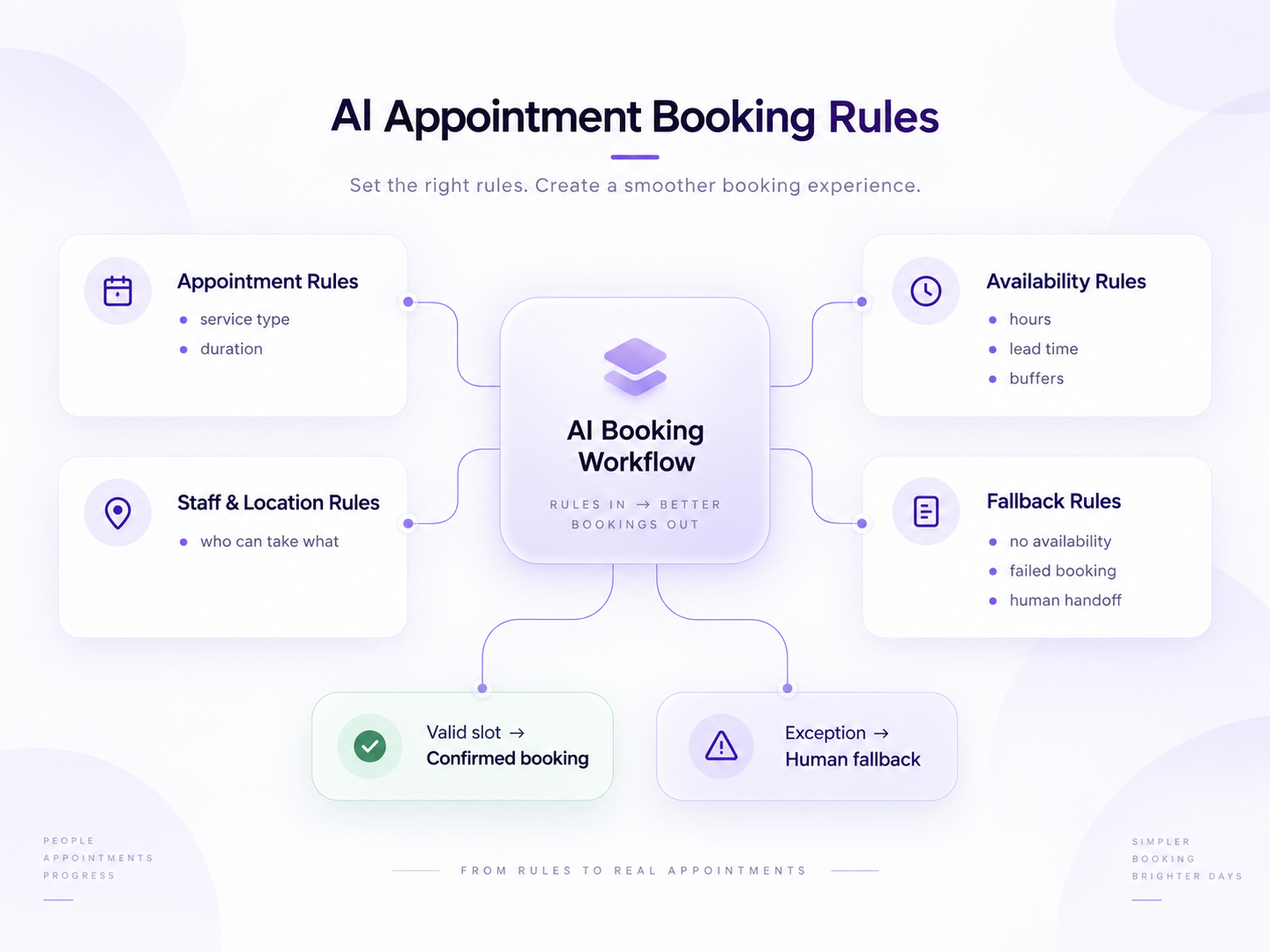
Appointment Rules
- What appointment types exist?
- How long is each one?
- Which services can be booked automatically?
- Which requests require human review?
Availability Rules
- What days are bookable?
- What hours are bookable?
- Is same-day booking allowed?
- What is the minimum lead time?
- How far in advance can someone book?
- Are buffers required?
Staff and Location Rules
- Which employee handles each appointment type?
- Does location affect availability?
- Can callers select a specific employee?
- What happens if that employee is unavailable?
Caller Information
- What details are required?
- What information should not be requested?
- Which fields must be confirmed?
Exception Rules
- What happens when no slot exists?
- What happens when the calendar connection fails?
- Which requests should transfer to a person?
- What is the fallback when nobody is available?
If these questions are unclear internally, adding AI will not make the underlying scheduling process clearer.
What Should You Measure After Launch?
Do not evaluate appointment automation only by counting how many calls the AI answered.
Track the booking workflow itself.
Useful measures can include:
- Appointment requests received
- Appointments successfully booked
- Requests that could not be booked
- Reschedules
- Cancellations
- Human handoffs
- Common reasons for failed bookings
- Common requested times with no availability
- Booking corrections
- Appointments requiring staff follow-up
This can reveal operational problems beyond the AI.
For example, repeated requests for unavailable evening appointments may indicate a scheduling-capacity issue rather than a call-answering issue.
Where Rexpt Fits
Rexpt supports appointment booking as part of its AI receptionist workflow. Current Rexpt product information includes calendar and appointment management, calendar sync, smart routing, and bookings among its call-handling capabilities.
In practice, the relevant setup is not simply:
Phone call → calendar
It is closer to:
Caller request → business context → booking rules → approved availability → confirmation → appointment or fallback
Rexpt can be configured around business information, appointment workflows, lead capture, routing, and human handoff so routine scheduling requests can move forward while exceptions retain a path to staff.
Because calendar and integration availability can vary by setup or plan, businesses should confirm the specific scheduling connection they intend to use before launch. Rexpt's own Terms also note that calendar-integration availability may vary by subscription plan.
Explore Rexpt's appointment booking and front-desk automation features.
Reliable Appointment Booking Is Mostly About Rules
The impressive part of AI appointment booking is the conversation.
The important part is the workflow behind it.
A reliable AI receptionist should not simply hear a preferred time and put something on a calendar.
It needs to determine what the caller wants, collect the necessary information, check real availability, apply the business's scheduling rules, confirm the details, create the appointment, and know when not to book.
That final point matters.
The goal is not to automate every appointment request. The goal is to automate the appointments that can be booked reliably and create a clear next step for the ones that cannot.
Get the scheduling rules right first.
Then let the conversation make those rules easier for customers to use.
Frequently Asked Questions
Can an AI receptionist book appointments directly into a calendar?

Yes, when the AI receptionist is connected to a supported calendar or scheduling workflow and has permission to create appointments. Reliable booking should also check approved availability and apply configured business rules before confirming a slot.
How does an AI receptionist know which appointment times are available?

The system can check availability through the connected calendar or scheduling integration. Availability should be combined with rules such as business hours, appointment duration, lead time, staff availability, buffers, and service requirements.
Can an AI receptionist prevent double bookings?
A properly configured workflow should check the scheduling system before confirming a slot and create the appointment in the shared source of scheduling truth. Conflict prevention ultimately depends on the calendar integration and its configuration.
Can an AI receptionist reschedule or cancel appointments?
It can when the connected scheduling workflow supports those actions and the appropriate rules are configured. Requests involving exceptions, unclear records, policies, or special circumstances may be better escalated to staff.
What happens if the AI cannot find an available appointment?
The workflow should have a defined fallback. That might mean offering another time, collecting a callback request, routing the call, or transferring the caller to a person. It should not promise an appointment that has not been confirmed.
Should every appointment request be automated?
No. Routine, well-defined bookings are usually the strongest candidates. Requests involving exceptions, sensitive circumstances, unclear service requirements, or business judgment should have a human escalation path.
On this page
- What Is AI Receptionist Appointment Booking?
- Taking a Message Is Not the Same as Booking an Appointment
- How AI Receptionist Appointment Booking Works Step by Step
- What Happens When the Requested Time Is Not Available?
- How Should Rescheduling and Cancellations Work?
- When Should an AI Receptionist Hand Booking to a Human?
- Example: A Home-Service Booking
- Example: An Appointment-Based Practice
- Appointment Booking During After-Hours and Overflow Calls
- Common AI Appointment Booking Mistakes
- What Should You Configure Before Turning On AI Appointment Booking?
- What Should You Measure After Launch?
- Where Rexpt Fits
- Reliable Appointment Booking Is Mostly About Rules
- Frequently Asked Questions
Stop missing
customer calls.
Rexpt answers calls, qualifies leads, and books appointments 24/7.